
SUNFISH Help
remaincalm SUNFISH models circuits from some of the weirdest synthesizers ever made, accessed through a sound morpher to get amazing sounds fast.
Quickstart Guide
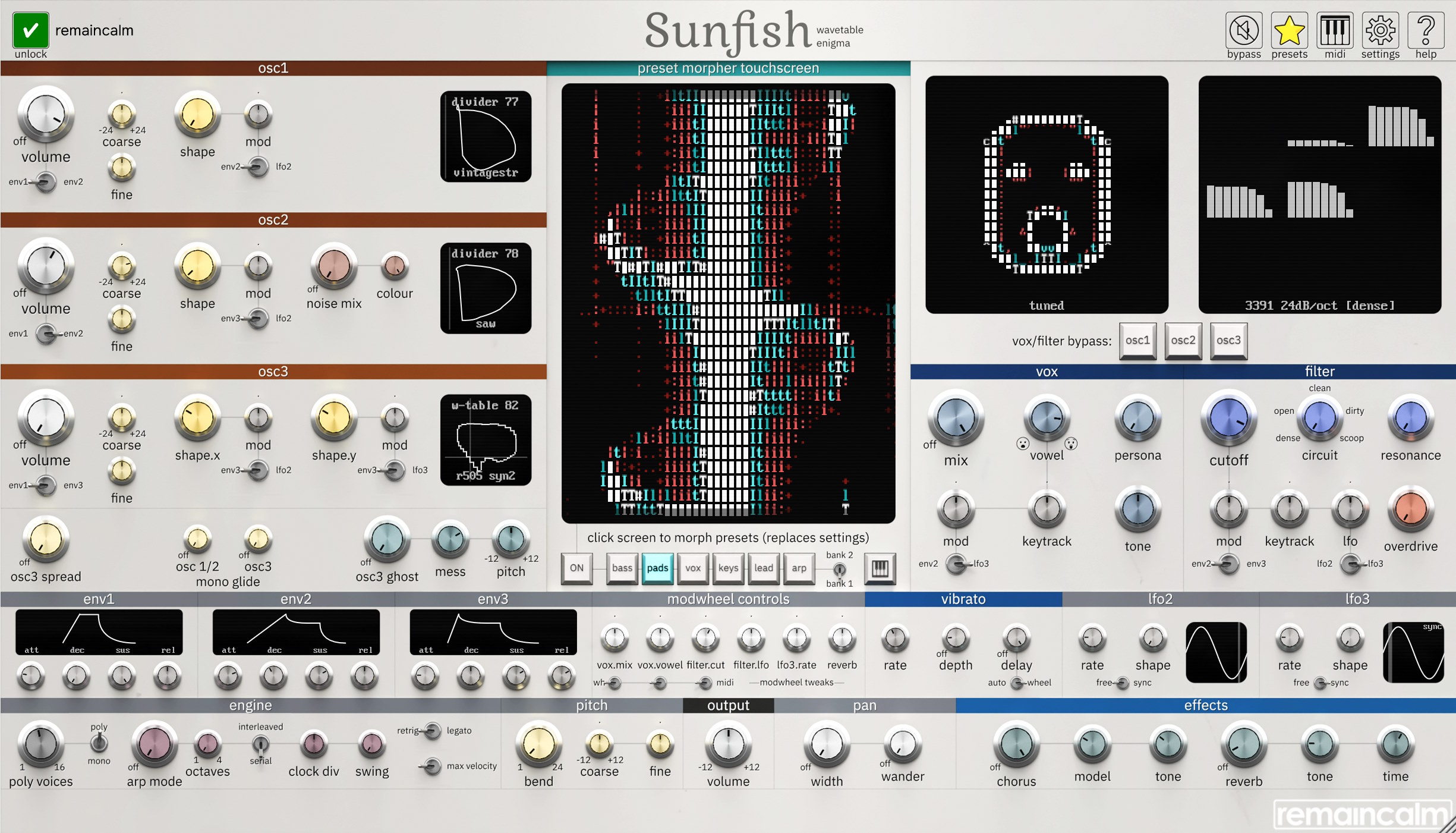
The big screen in the middle is the morpher. Click/drag the screen and use the category and bank controls to explore SUNFISH's palette, or use the full control set to nerd out once you get close to something you like.
Tutorials
Registration
Click the key icon (top-left) and paste in the entire registration code you received via email. By default, your name will be shown on the plugin screen. This can be disabled in the settings.
Contact support@remaincalm.org if you run into any issues.
If unregistered, the plugin will not save any settings or presets, and a weird noise will interrupt playback from time to time.
We've chosen to use a user-friendly, minimally-intrusive registration system. Please don't distribute registration codes. Thanks.
Detailed Manual
Architecture
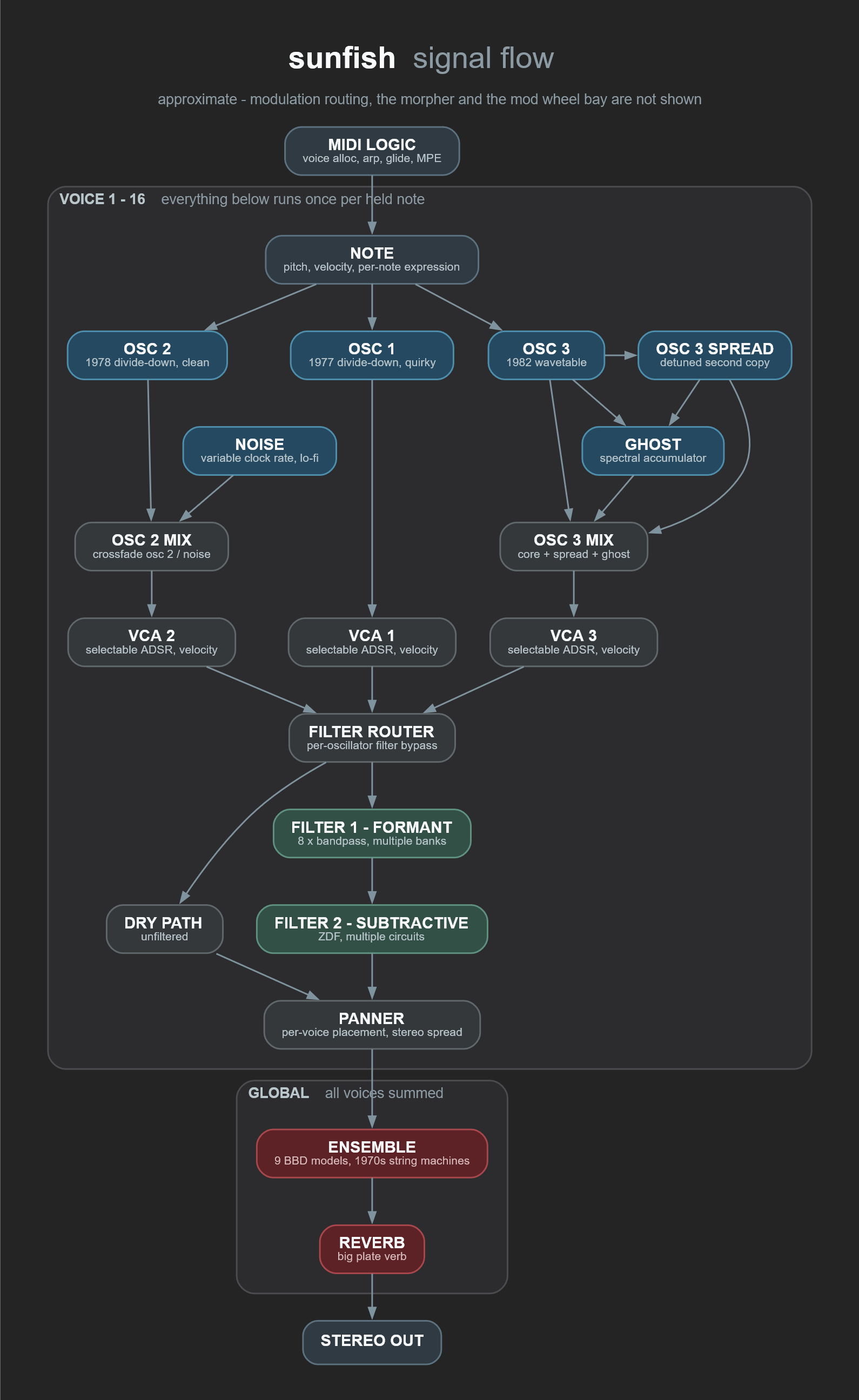
Sunfish can be broadly described as a three-oscillator, two-filter subtractive polysynth, with many odd quirks.
We've modelled interesting circuits from lots of obscure 1970s and 1980s hardware, and then tweaked them further until they worked together to make something fresh.
The Morpher
The central panel houses The Morpher. Clicking or dragging on this area smoothly scrubs between different sounds:
- Pick a category with the buttons underneath the screen.
- Click/drag around the screen to explore sounds within that category. This replaces the current sound.
- Flip the 'bank' switch (bank 1 / bank 2) for more sounds in each category.
- Found something close? Turn the morpher off with the ON button (or just grab any locked control) and the current settings are stored back to your session. Then tweak with the full control set.
The 'vox' sounds are best with the modwheel up about 20%. The morpher position can be host-automated with the morph.x / morph.y parameters.
Oscillators
| Oscillator | Engine | Notes |
|---|---|---|
| osc1 | Divide-down, 1977 variant | Based on divide-down string synths. Models a bunch of weird quirks we've scoped on actual hardware. Crossfades from filtered "string" saw, through quantized sum-of-squares saw, through to a quirky almost-pulse with variable duty-cycle. |
| osc2 | Divide-down, 1978 variant | More "ideal" than osc1, with typical saw/pulse shapes. Can be crossfaded with a free-clockable noise oscillator. |
| osc3 | 16x2 wavetable, modelled on devices from 1982-1985 | Wavetables extracted from some very interesting sources, including home organs, and a rare-as-butts Gleeman Pentaphonic, plus a few sounds we hand-picked to fill in some timbre gaps. Per-voice drift. Drifts very slightly vs osc1/2. |
With finetune at zero, osc1 and osc2 stay phase-locked - so in mono mode, osc2 can work like a suboscillator, and in poly mode you get a lovely stability to chords and pads.
osc3 has a spread mode that adds a detuned copy, and a "ghost" function: a per-voice, pre-filter/VCA, pitched spectral accumulator - a per-note reverb. It adds shimmer to pads ... or explosive meltdowns to bass.
Filters
Filter 1 is a formant "vocal" filter with seven different models ("personas") - some from academia, some based on ideas from hardware like the VP-330, some tuned by ear. Formant mix and vowel can be modulated by sources including MIDI params.
Filter 2 is a subtractive filter with 5 circuits:
| Circuit | Model | Notes |
|---|---|---|
| dense | 3391-style OTA lowpass, 4-pole (24dB) | We modelled this on a surprisingly nice chip-based filter we found in a 1980s home organ. But it was a bit wimpy, so we added some extra waveshaping for a bit more heft. Good for bass. Reduce the oscillator level hitting the filter (and make up the volume in your session) for increased resonance. |
| open | 3391-style OTA lowpass, 2-pole (12dB) | Variant of the former. Tweaked for reduced resonance, more drive, and more 'air'. Good for pads. |
| clean | Tone filter, 2-pole lowpass | No waveshaping. The resonance dial controls a mud-cut, treble bump. |
| dirty | 6581-style lowpass, 2-pole (12dB) | Based on the home computer classic. Crunchy, with leakage and low headroom. Matches our ref hardware closely around midrange, but we changed the cutoff behaviour so that it's more useful on bass. The resonance control is more of a weird shaper. |
| scoop | 6581-style notch filter, 2-pole | Crossfades to highpass with high resonance. Useful for phaser effects. |
All filter circuits except 'clean' can overdrive; when filters are slammed, resonance acts more like an additional waveshaper control.
Filters are fully polyphonic. Individual oscillators can be selected to skip the filters for interesting layering possibilities.
Modulation and Control
- Lots of stuff can be modulated. Most modulators have one toggle to give a bit of freedom without overwhelming with controls.
- There's a big modwheel bay in the middle that routes modwheel signals to different controls. You can set three of those signals to per-note MPE controls with the toggle under the dial and the MIDI config in the top-right of the window. Per-note pitch bend should also work.
- There's an arpeggiator and all the other standard synth features, but everything has been tweaked and nudged to be a bit different from normal. E.g. the envelopes are all velocity sensitive by default (there's a master override) like some mis-built analog gear, osc1/2 and osc3 slide use different controls and algorithms so you can do some cool SID-style tricks, the whole thing has been built to sound great but be just bent enough to stand out.
Effects
- Chorus is a modified version of the ensemble module from our Gossamer plugin, based on classic 1970s string synths and early 80s effects. "In-between" values are crossfaded between different circuits. Higher settings are more modern than lower settings.
- Reverb is based on a late-1990s algorithm, tuned to sound best on big pads.
Advanced Notes
- The filters are all circuit-modelled, and can get very gnarly with loud, detuned content with lots of harmonics. The "clean" filter has no waveshaping; use this if you need maximum clarity.
- The filters add a LOT of character, but they can dominate the sound at some settings. If the oscillator controls don't seem to be doing much, back off on the filters a little.
- The osc3 "ghost" control has a lot of power to add shimmer, density and unpredictable weirdness to sounds. With osc3 on, start with pitch at +12, mess at 0, and turn the main osc3 mix control up about half - you should hear a jumbly octave layer emerge on top of held notes. The extra harmonics can add a lot of unpredictable timbres when hitting an overdriven filter as well, which is an amazing trick for complex slow bass tones.
- The oscillators and filters all use a lot of tricks to efficiently reduce aliasing (weird pitch artifacts), but there are some pathological cases where some artifacts can creep in. Select the 4x quality setting in the settings dialog to minimize this.
- Each oscillator can have a different vca envelope, allowing for interesting layering tricks. Use the per-osc filter bypass controls and the LFOs for additional interesting sound evolution.
- The controls have all been extensively tuned for interesting control options. For example, the first 5% of the vibrato speed dial drops speed by about 10x, for woozy "seasick"-type pitch modulation
- We tried to reproduce some of the weird behaviours we found on some old hardware we studied. The note slide, legato, (velocity-sensitive) envelopes, and keytrack controls all have curious interactions with the surrounding features.
Controls
Labels are as shown on the plugin screen. Hover over any control in the plugin for the same help text.
morpher
Sound morpher. Replaces current plugin sound. Click/drag the screen to explore sounds within the selected preset category (underneath).
| Control | Notes |
|---|---|
| bass, pads, vox, keys, lead, arp | Select the morpher preset category. The 'vox' sounds are best with the modwheel up about 20%. |
| bank 1 / bank 2 | Switch between banks of morpher preset sounds. |
| ON | Use the central screen to explore sounds within the chosen preset bank. Toggle this control off (or adjust any locked control) to store the current settings back to the session. |
| keyboard button | Toggle onscreen MIDI keyboard. |
oscillators (all)
| Control | Notes |
|---|---|
| volume | Osc level. The filter can be overdriven at high levels, which reduces resonance effects. |
| envN switch | Osc amplitude envelope source (choice of two envelope sources). |
| coarse | Osc coarse detune (semitones). |
| fine | Osc fine detune (cents). |
| mod | Osc wave mod depth. |
| mod source switch | Osc wave mod source (choice of two mod sources). |
osc1
Divide-down oscillator, 1977 variant - quirky. Osc1/2 are phase locked if both finetunes are 0. Drag screen to change waveform.
| Control | Notes |
|---|---|
| osc 1/2 (mono glide) | Osc1/2 mono/legato portamento time. |
| shape | Osc1 waveform. Sweeps through retro strings, quantized saw, nearly-square, nearly-pulse. |
osc2
Divide-down oscillator, 1978 variant - conventional. Osc1/2 are phase locked if both finetunes are 0. Drag screen to change waveform.
| Control | Notes |
|---|---|
| shape | Osc2 waveform. Sweeps through sawtooth, quantized saw, square, pulse. |
| noise mix | Osc2 retro noise circuit mix. |
| colour | Sample-rate of Osc2 noise circuit. |
osc3
Wavetable oscillator, modelled on devices from 1982-1985. Drag screen to change waveform. 'spread' control adds an additional detuned Osc3. 'ghost' control adds a slow per-voice spectral processor.
| Control | Notes |
|---|---|
| osc3 (mono glide) | Osc3 mono/legato portamento time. |
| shape.x | Retro wavetable X position. Changes oscillator timbre. 16 grid positions. |
| mod.x | Wavetable X mod depth. |
| shape.y | Retro wavetable Y layer. Changes oscillator timbre. 2 grid positions. |
| mod.y | Wavetable Y mod depth. |
| osc3 spread | Osc3 detuned spread amount - creates a detuned copy of osc3 and equally shifts both osc3s above and below the target pitch. Interactive with the 'ghost' control. |
| osc3 ghost | 'Ghost' spectral processor mix on Osc3. This repurposes an aliasing lo-fi reverb circuit to add complex per-voice timbres. Can interact with the filters and vibrato in unpredictable ways. |
| mess | Spectral processor attack and decay times - higher values give slower attack and release and more complex internal mixing. |
| pitch | Spectral processor granular pitch offset. Use to create glitchy pitched effects. |
vox (formant filter)
Vintage-modelled formant filter bank - up to 8 bandpass filters for vocal and resonator effects. Drag screen to change mix and frequencies.
| Control | Notes |
|---|---|
| mix | Formant filter mix - banks of per-voice bandpass filters to add vocal quality to timbre. |
| vowel | Formant filter 'vowel' setting - changes timbre of the filter. Interactive with the 'persona' control. |
| persona | Formant character preset: tuned, deep, robotic, human, nasal, shrill, retro. Sweeps through models from vintage circuits, academic literature, and chosen by ear. |
| tone | Formant brightness. Controls the balance of formant bandpass filters. |
| mod | Vowel modulation depth. |
| mod source | Formant mod source: Env2 or LFO3. |
| keytrack | Formant keyboard tracking amount. |
filter
Subtractive filters, circuit-modelled on a curious 3391-based OTA filter, a crunchy 6581-based chiptune filter, and a tuned tone control. Circuit models have been tweaked to work best with the oscillators but retain their original character. Drag screen to change cutoff and resonance.
| Control | Notes |
|---|---|
| cutoff | Filter cutoff frequency. |
| circuit | Filter circuit: dense, open, clean, dirty, scoop (see the filter table, above). |
| resonance | Filter resonance. Filter circuits have different resonant behaviour. The 'clean' model adds a res-controlled enhancer; the 6581-B 'scoop' model crossfades to a HPF. |
| overdrive | Filter input drive. |
| mod | Filter envelope depth. |
| mod source | Filter envelope source: Env2 or Env3. |
| lfo | Filter LFO modulation depth. |
| lfo source | Filter LFO source: LFO2 or LFO3. |
| keytrack | Filter keyboard tracking amount. |
| vox/filter bypass: osc1, osc2, osc3 | Disable routing that oscillator through the formant bank and filter. |
env1/env2/env3
ADSR envelope. Analog-style, velocity sensitive. Use 'max velocity' switch in 'engine' section to switch envelopes to full volume. Drag screen to change envelope timings.
| Control | Notes |
|---|---|
| attack | Envelope attack time. |
| decay | Envelope decay time. |
| sustain | Envelope sustain level. |
| release | Envelope release time. |
vibrato (lfo1)
| Control | Notes |
|---|---|
| rate | Vibrato rate. |
| depth | Max vibrato depth in cents. |
| delay | Vibrato ramp-in time (auto-ramp mode only). |
| auto / wheel | Vibrato source: auto-ramp on note onset, or mod wheel. |
lfo2 and lfo3
Wavetable LFO. Drag screen to change rate and shape.
| Control | Notes |
|---|---|
| rate | LFO rate. |
| shape | LFO waveform shape. |
| free / sync | LFO tempo sync. |
modwheel tweaks
| Control | Notes |
|---|---|
| vox.mix | Mod wheel (toggle left) or per-channel MPE parameter (toggle right) expression amount to vocal formant effects. Per-note. |
| vox.vowel | Mod wheel (toggle left) or per-channel MPE parameter (toggle right) expression amount to vocal 'vowel'. Per-note. |
| filter.cut | Mod wheel (toggle left) or per-channel MPE parameter (toggle right) expression amount to filter cutoff. Per-note. |
| wheel / midi toggles | Toggle modulation source between modwheel and MPE expression (use MIDI global config to select source, near top-right of window). |
| filter.lfo | Mod wheel depth to filter LFO depth. Global. |
| lfo3.rate | Mod wheel depth to LFO3 rate - changes LFO3 speed (free or synced) with the mod wheel. Global. |
| reverb | Mod wheel depth to reverb mix. Global. |
effects
| Control | Notes |
|---|---|
| chorus | Chorus mix, modelled on 1970s BBD ensemble effects. |
| model | Chorus character. Crossfades between ensemble models inspired by classic 1970s equipment. |
| tone | Chorus tone, varies across ensemble models. |
| reverb | Reverb mix. |
| tone | Reverb tone. |
| time | Reverb decay time. |
engine and arp
| Control | Notes |
|---|---|
| poly voices | Maximum polyphony. |
| mono / poly | Mono or polyphonic mode. Mono mode forces voice limit to 1. |
| retrig / legato | Note retrigger mode: retrig resets oscillator phase; legato continues without phase reset and has different glide behaviour. |
| max velocity | Force all note velocities to maximum (and also changes envelope behaviour). |
| arp mode | Arp on/off, and arpeggiator mode. |
| octaves | Arp octave range. Held notes are repeated across the selected number of octaves. |
| serial / interleaved | Arp octave ordering: serial plays each octave in sequence; interleaved mixes notes across octaves. |
| clock div | Arp clock rate. Syncs to host tempo when available. |
| swing | Arp swing amount. |
global and pitch
| Control | Notes |
|---|---|
| volume | Output level. |
| width | Stereo width voice randomization (pre-FX). |
| wander | Per-voice slow pan drift depth (pre-FX). |
| bend | Pitch bend wheel range in semitones.. |
| coarse | Master coarse tune (semitones). |
| fine | Master fine tune (cents). |
Settings
Click the gear icon to open a settings screen.
Presets
Click the star icon to try out some presets.
Bug Reports
Please email support@remaincalm.org
Legal
Use of this software is subject to our Terms and Conditions and End User License Agreement.